Ongoing support
Management · $497/month
30 new branded Pin designs and up to 90 scheduled placements each month, with keyword planning, monthly reporting, a recorded review, and email support.
Explore the $497 Plan →
The number that stands out in my Upgraded Health Pinterest Analytics is 1.05 million outbound clicks. The same screenshot shows 34.88 million impressions. Both are substantial, but they answer different questions.
Impressions tell me content appeared on a screen. Outbound clicks tell me someone took an action toward a destination outside Pinterest. When you operate a content website, that next step deserves attention.
I’m Nick Garcia, founder of Viral Pins Agency. I built Upgraded Health’s Pinterest account from scratch and continue to manage it. It’s one of seven channels I’ve grown across health, food, home and design.
This article breaks down the numbers, explains what they do and don’t establish, and walks through how I would approach building a Pinterest traffic plan around an existing content business.
The quick answer: Pinterest outbound clicks measure clicks to the destination URL associated with a Pin. They are useful for understanding traffic potential, but they are not a count of unique visitors, subscribers or sales.
| Pinterest metric | Result shown |
|---|---|
| Impressions | 34.88 million |
| Engagements | 2.94 million |
| Outbound clicks | 1.05 million |
| Saves | 290.41 thousand |
| Total audience | 9.34 million |
| Engaged audience | 1.1 million |
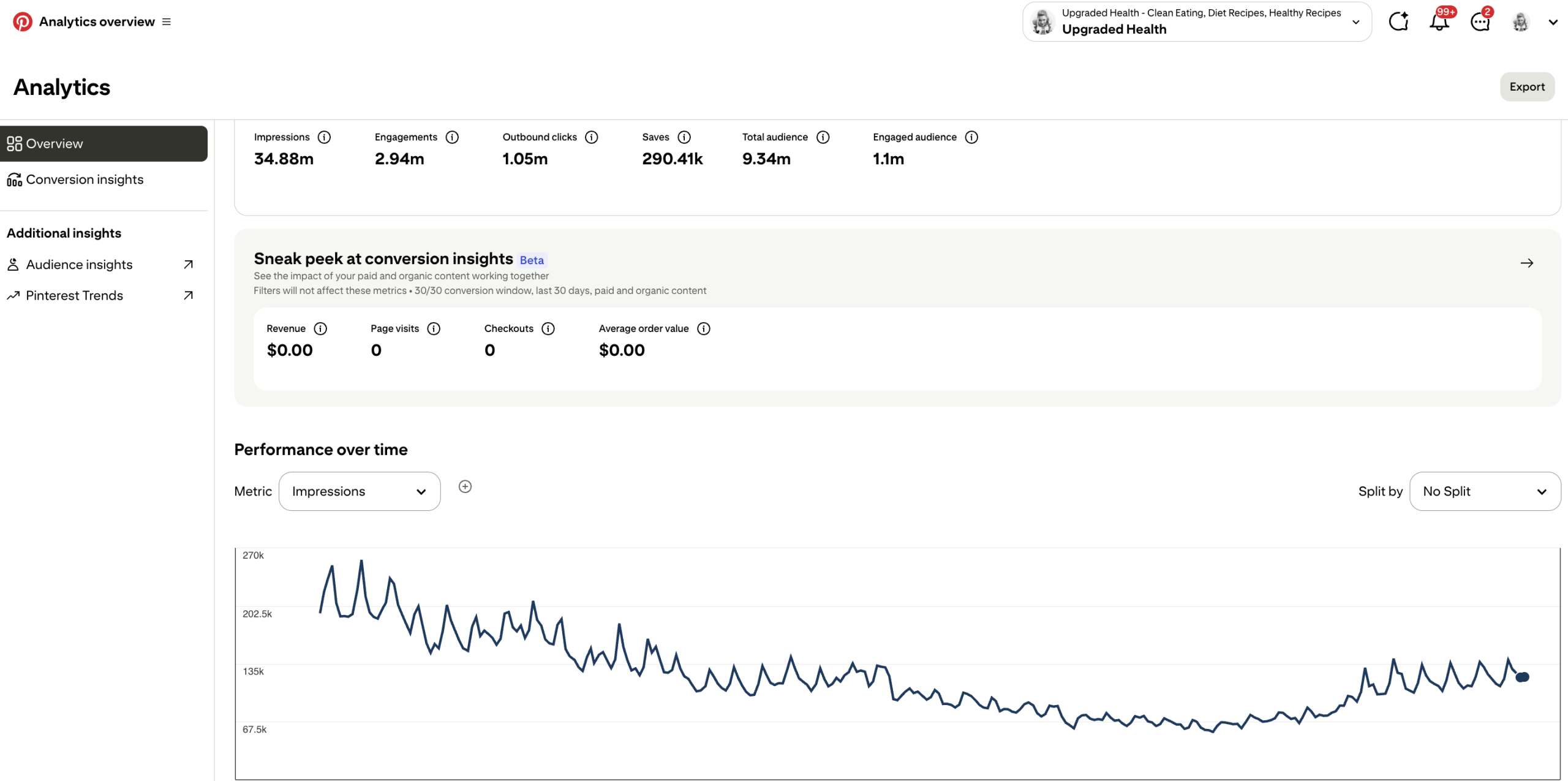
Reporting context: These are the totals displayed in the supplied screenshot, captured October 22, 2026. The selected reporting dates are outside the image. Treat them as totals for that selected period—not monthly figures or a verified lifetime total. The screenshot also does not establish the organic-versus-paid breakdown.
You can see this account alongside the others in my Pinterest channel portfolio. All seven were built from scratch and are managed by me.
The graph is worth looking at too. It includes higher and lower periods. A large cumulative total can coexist with a declining stretch, a recovery or substantial variation. The total alone doesn’t prove uninterrupted growth.
Pinterest separates impressions, saves, Pin clicks and outbound clicks in its reporting. For the current terminology and metric definitions, see Pinterest’s Analytics guide.
| Metric | Question it helps answer |
|---|---|
| Impressions | Is the content being shown? |
| Saves | Are people saving it for later? |
| Pin clicks | Are people opening or interacting with the Pin itself? |
| Outbound clicks | Are people clicking toward the linked destination? |
| Website sessions and conversions | What is happening after people reach the site? Measure this separately. |
If the objective is to bring relevant readers to an article or resource, outbound clicks connect more directly to that objective than impressions alone. Saves and visibility still provide context. A saved checklist may be useful even when the reader doesn’t visit immediately.
I would avoid judging every Pin by one metric without considering its purpose. An educational infographic, a recipe roundup and a product-focused Pin may invite different actions.
A click count measures actions, not distinct people. One person can click more than once. A click also doesn’t prove the destination finished loading or that a visitor took a meaningful action there.
That is why I wouldn’t rewrite this result as “1.05 million new customers,” “1.05 million unique visitors,” or a revenue claim. The screenshot supports none of those statements.
To understand the business impact, I would compare Pinterest reporting with website analytics and the systems that record signups or purchases. Use the same dates, distinguish users from sessions, and check how the website identifies traffic sources. Expect the systems to answer related but different questions rather than demanding identical totals.
The practical question is: did the visitors reaching the page find what they expected, and did some take the next step that matters to the business?
Using the rounded totals in the screenshot, 1.05 million outbound clicks divided by 34.88 million impressions works out to approximately 3.01%.
Illustrative calculation: 1,050,000 ÷ 34,880,000 × 100 ≈ 3.01%.
This is a calculation from rounded displayed totals, not a separately exported rate from the dashboard. It is not a benchmark or a promise for another account.
The useful lesson is the relationship between distribution and action. More impressions can produce more clicks even if the rate stays flat. A clearer message might improve the rate while total clicks remain modest because the Pin has little distribution. Look at both the click count and the opportunity behind it.
The screenshots document account-level results and, where visible, Pinterest’s period-over-period comparisons. They do not isolate the effect of a particular headline, publishing frequency, design tool or keyword.
I can explain my approach and show work from accounts I manage. I can’t honestly claim that one isolated tactic caused this entire cumulative result without the supporting analysis.
The following workflow is a practical way to approach a content business. It is not a reconstruction of every historical action behind Upgraded Health’s total.
Before opening a design tool, choose the pages you want people to visit. A good starting page answers a clear question, contains something useful and works on a phone.
For a recipe site, that might be a complete recipe or a roundup that makes choosing dinner easier. For a creator, it might be a detailed tutorial or a resource leading to a relevant offer.
Sending more people to a confusing page doesn’t fix the confusion. It just gives more people the same experience.
“Healthy food” is a topic. “I need breakfast ready before the kids leave for school” is a situation. Specific situations make it easier to choose both an article and a Pin message.
Consider a hypothetical high-protein breakfast roundup. Depending on what it contains, it could serve people looking for make-ahead breakfasts, alternatives to eggs, family-friendly options or quick meals using common ingredients.
Those are different angles. Each should be used only when the destination genuinely addresses it. You don’t need a dramatic claim when a useful, specific promise will do.
I would use relevant Pinterest search results, suggested wording and the account’s own performance history to build an initial set of topic phrases. These are research inputs, not proof of a precise search volume.
The goal is to describe the page in language the intended reader recognizes. Carry that relevance through the Pin’s visible text, title, description and appropriate board selection. Avoid forcing unrelated phrases into the copy simply because they sound popular.
Start with a focused topic list you can use consistently. It is easier to learn from a coherent set of content than from a collection of unrelated experiments.
One article can support several Pins without becoming five copies of the same message. A useful variation changes the angle, not just the background color.
| Hypothetical article | Creative angle | What must be true |
|---|---|---|
| High-protein breakfast roundup | Make breakfast ahead of time | The article includes options that can be prepared ahead. |
| The same roundup | Breakfast when you’re tired of eggs | It contains enough suitable alternatives. |
| The same roundup | Compare several breakfast ideas at a glance | The dishes shown are actually covered. |
| The same roundup | A short meal-planning checklist | The checklist accurately reflects the article’s guidance. |
This is where content knowledge matters. If you don’t understand the destination, it is easy to create a strong headline for the wrong article.
I would check the Pin at a small viewing size. Can you recognize the subject? Read the main message? Understand what clicking will give you?
A polished design can still communicate very little. Too many small labels, an indistinct photo or a vague title can bury the reason to care. Strong hierarchy helps: one main promise, a supporting visual and enough detail to make the subject credible.
Before scheduling, check the destination URL. A beautifully designed Pin pointing to the wrong page is still a broken experience.
I wouldn’t choose a publishing target before looking at the content available and the capacity to create worthwhile variations. More output is useful only if relevance and quality hold up.
Keep a working record of the destination, creative angle, publication date and variations. That gives you something to compare later and helps prevent accidental repetition.
In my management offer, I distinguish new designs from scheduled placements. Thirty new designs and up to ninety placements are not ninety unique designs. Clear scope makes planning and reporting easier.
A monthly review should end with decisions. Which destinations contributed clicks? Which messages attracted saves? What should receive a fresh variation? Is there a page that needs work before you promote it again?
Compare like with like where possible. Different topics, reporting windows and amounts of distribution make simple winner-versus-loser claims unreliable. Early observations can guide the next test without proving a permanent rule.
The million-click headline is part of the story. Smaller accounts show another part: building an audience and learning which content earns a response.
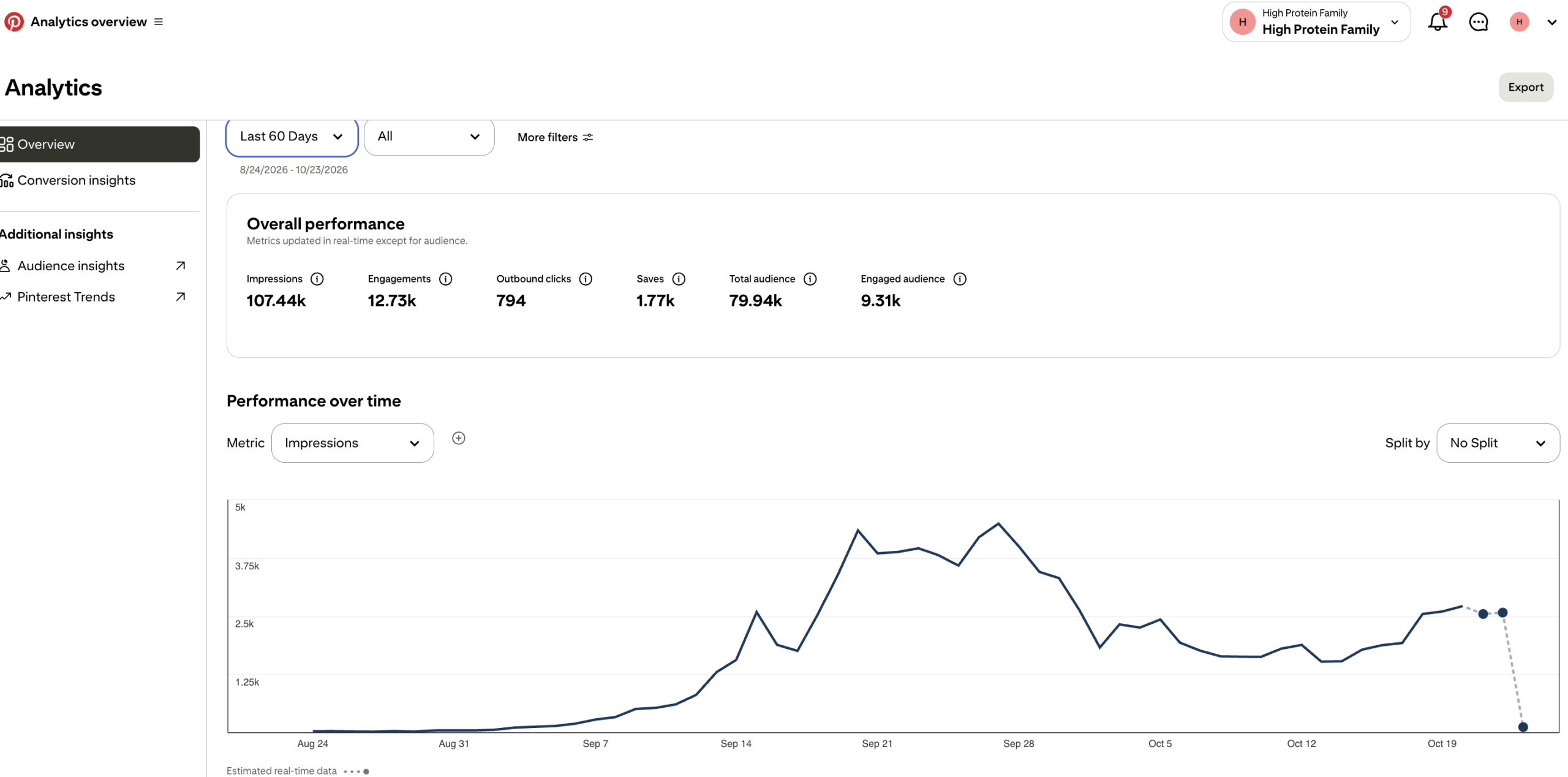
High Protein Family recorded 107.44K impressions, 794 outbound clicks and 1.77K saves for the displayed August 24–October 23, 2026 window. I grew this account from scratch, but that reporting window should not be read as its verified launch-to-result timeline.
For someone starting out, identifying a promising topic or a headline that earns relevant clicks can be a useful early finding. That tells you where to focus your next batch. It is more actionable than comparing your first month with another account’s cumulative total.
Jennifer – Home Decor and Design recorded 183 outbound clicks, up 422%, for September 22–October 22, 2026 compared with the preceding 31-day period. The percentage is encouraging; the actual count tells you the scale.
Clean Eating and Smart Living recorded 27.38K outbound clicks, up 63%, for July 25–October 23, 2026 compared with the preceding 90 days. It also showed 2.05M impressions, up 20%, while saves fell 19%.
That last detail matters. An account can earn more outbound clicks while another metric falls. It is a reason to investigate the content and objective, rather than describing every change as either a complete success or failure.
These accounts and reporting periods are separate examples. I would not add their audience figures together or present their percentages as one combined growth rate.
| What you observe | Questions to investigate | A useful next test |
|---|---|---|
| Low distribution and few clicks | Does the topic match the account and destination? Is the message clear? | Try a more relevant topic-angle combination. |
| Impressions but few outbound clicks | Is the reason to visit specific? Does the Pin already answer the whole question? | Test a clearer, accurate headline and visual hierarchy. |
| Clicks but little website engagement | Does the page match the promise and work on mobile? | Review the destination before increasing promotion. |
| Engagement but few signups | Is the next step relevant, visible and working? | Check the form and offer; review available website tracking. |
| A sudden drop | Did dates, filters, links, publishing or content mix change? | Check the data and recent changes before diagnosing a cause. |
These are diagnostic starting points. A chart alone cannot tell you whether a change came from seasonality, distribution, content quality, technical problems or several factors together.
This is a workflow, not a thirty-day traffic promise. Account history, available content, implementation and audience response all affect what happens next.
No. They are separate metrics. A Pin click concerns interaction with the Pin; an outbound click concerns the linked destination. Use the outbound-click measure when evaluating clicks toward your website.
There isn’t a useful universal target for every business. Consider your baseline, reporting dates, content volume, distribution and what the visitors do on your website. A small relevant audience can matter more than a much larger uninterested one.
These screenshots do not establish a standard timeline. I have built all seven featured accounts from scratch, but their selected reporting windows do not necessarily start on their launch dates. I would evaluate progress against each account’s own baseline.
That is not the claim. The screenshot shows 1.05 million outbound clicks for its selected reporting period, and the dates are not visible. It should not be described as a monthly result.
No. Historical results demonstrate experience, not a guaranteed outcome for another business. A manager can explain scope, process, reporting and decisions; no one should turn an example account’s total into your forecast.
You need enough useful content to support the work you’re buying. If the main issue is a new account foundation, a focused setup may fit better. If an existing account needs diagnosis, an audit can be a more appropriate starting point than ongoing publishing.
If you already publish useful articles, resources or digital products, my Pinterest management service is designed to connect that content with a consistent research, creative and publishing process.
The plan is $497/month: thirty new branded Pin designs, up to ninety scheduled placements, keyword research and content priorities, monthly reporting, a short recorded review and email support for one account and one website. It starts with a three-month commitment ($1,491 total), billed monthly, then continues month-to-month.
For a focused starting point, explore account setup, a Pinterest account audit or a $97, sixty-minute strategy call.
Send me your website and goals for a free management inquiry. You don’t need to purchase a strategy call first.